Scheduler in Liferay 7 /DXP, Isn’t it easy?
Often, there are requirements to automate certain process and execute it on regular interval. Scheduler programming helps for all such requirement. Liferay provides a flexible way to implement scheduler. In this post, I am going to talk about, steps to create scheduler in Liferay DXP/7.
Following are the prerequisite to start implementation,
Pre-requisites:
- Java 1.8
- Liferay Developer studio
- Liferay DXP/7
Starting point to implement Scheduler in Liferay DXP/7 is to create module in Liferay workspace.
Create module in Liferay workspace:
To create Liferay modules, Right Click → New → Liferay Module Project. Give appropriate name and click finish.
You should see project structure as follow,
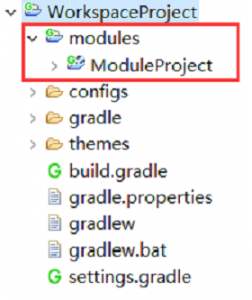
Now that you have created module in Liferay development environment, next step is to create class for scheduler. In this example I created class with name ‘LiferayScheduler’ under package com.enprowess.schedulerclass.
You need to extend BaseSchedulerEntryMessageListener class. This is abstract class contains default implementation for scheduler. You need to override two methods doReceive() and activate().
doReceive() : Implement the logic to execute on regular interval in this method. Ex,
@Override

protected void doReceive(Message message) throws Exception {

log.info("Add your business logic for schedule here…");

}
activate() : In this method you need to define schedule time to execute scheduler. Ex.
@Activate

@Modified

protected void activate() {

schedulerEntryImpl.setTrigger (

TriggerFactoryUtil.createTrigger(getEventListenerClass(), getEventListenerClass(), 24, TimeUnit.HOUR));

_schedulerEngineHelper.register(this, schedulerEntryImpl, DestinationNames.SCHEDULER_DISPATCH);

}
In above example, I am setting scheduler to execute on every 24 hours. Following are the method signatures of TriggerFactoryUtil to configure scheduler time interval,
- createTrigger(String jobName, String groupName, Date startDate, Date endDate, int interval, TimeUnit timeUnit)
- createTrigger(String jobName, String groupName, Date startDate, Date endDate, String cronExpression)
- createTrigger(String jobName, String groupName, Date startDate, int interval, TimeUnit timeUnit)
- createTrigger(String jobName, String groupName, Date startDate, String cronExpression)
- createTrigger(String jobName, String groupName, int interval, TimeUnit timeUnit)
- createTrigger(String jobName, String groupName, String cronExpression)
I hope this post will give you fair idea how to implement scheduler in Liferay DXP/7. Happy coding!
Blog by,
Maitrik Panchal
Seems to be a pretty good method, yet as someone new to Liferay I’d like further assistance.
I’m using Liferay IDE, because Liferay Developer Studio is a payed software. I’m sure that their functionality is mostly the same.
Now, when someone wants to create a module project, they are asked to select a template too, which by default is the MVC portlet template. As I couldn’t find an appropriate clean template, please let us know in-depth how to create the module project with the appropriate structure.
Second and lastly I the examples you gave, but the variable _schedulerEngineHelper is nowhere to be declared, so the code has errors.
Please let us know if this method is still usable with Liferay 7 GA4 or which are the appropriate steps in-depth for creating a Scheduler module in Liferay 7.
Thank you very much!
Hi MEZesUBI,
Thank you for the comment. By the way, I am also using Liferay IDE but just mention here, Liferay Developer Studio is available free too, though functionality are almost same.
Regarding template, as I have mention in blog is just to Right Click-> New -> Liferay module project, this should create it. If you can provide more detail what problem you are facing, certainly I can help you further.
To elaborate at detail level, _schedulerEngineHelper variable should be defined in the class and should have setter method as below :
private SchedulerEngineHelper _schedulerEngineHelper;
@Reference(unbind = “-“)
public void setschedulerEngineHelper(SchedulerEngineHelper _schedulerEngineHelper) {
this._schedulerEngineHelper = _schedulerEngineHelper;
}
This is considered as better way of accessing service which can be bind by setter.
This is all valid in Liferay 7 GA4 too. Further to this, if needed, I would happy to share the code base, please drop your email id to info@enprowess.com.
How to mention my custom scheduler class in above method.
For an example in liferay 6.2 will create like this right.
de.ancud.webakte.scheduler.KundenBenachrichtigungScheduler
Hi gayu M,
Thank you for visiting the blog. You are right, that was the way with Liferay 6.x.
Since Liferay 7/DXP, it is changed. It just need an annotation @component and appropriate class to extend it. In this example it should be like this:
@Component
public class LiferayScheduler extends BaseSchedulerEntryMessageListener
Hope this helps!!!
Thanks, That was very helpful